Most common
Phone booking
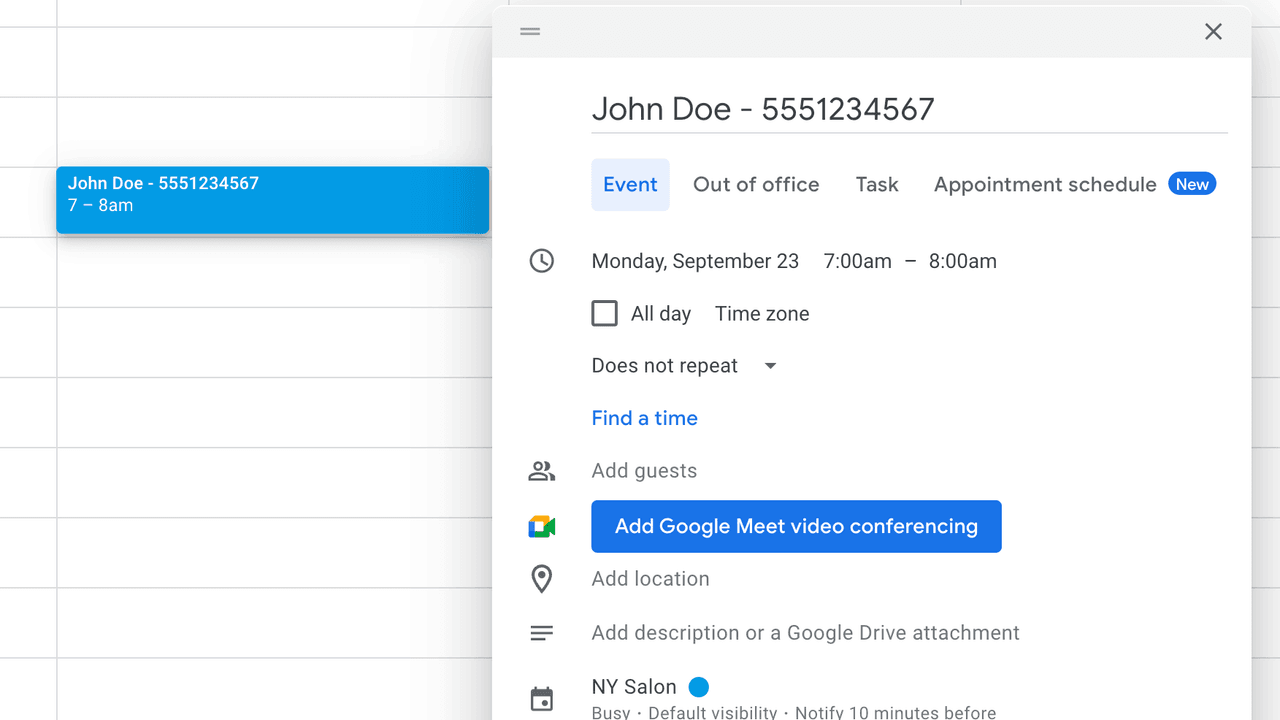
A client calls and books Thursday at 2. You type the appointment into Google Calendar the same way you always do. Etisia handles the reminder layer on top.
If Google Calendar already runs your appointments, you do not need to replace it to send SMS reminders. Etisia connects to the same calendar you already use and adds the reminder layer on top. Phone bookings, text bookings, DMs, walk-ins, booking links — it does not matter how the appointment got there. If it ends up in Google Calendar, your clients can get reminded.
Keep Google Calendar. Add SMS reminders. Change almost nothing.
Real appointment businesses rarely book through one tidy system. Some appointments come in by phone, some by text, some by Instagram DM, some in person, and some through a booking link. Google Calendar is where all of that ends up.
That is why migration feels wrong.
The problem is usually not your calendar. The problem is that Google Calendar does not send client SMS reminders on its own.
The fix should add the missing reminder layer — not replace the system your team already knows.
This is the real question behind migration fear. Not "what features does it have?" but "what do I actually have to change?"
| What stays the same | What changes |
|---|---|
| You still create and edit appointments in Google Calendar | Clients start receiving SMS reminders automatically |
| You still book however you already book — phone, text, DM, walk-in, booking link | Every reminder includes a cancellation link |
| Your team still uses the same shared calendars | Reminder status becomes visible on calendar event titles |
| Upcoming appointments already on your calendar stay there | If a client cancels through the link, you know quickly and can refill the slot |
The calendar stays yours. The reminder layer is what changes.
These are not edge cases. This is normal.
Most common
A client calls and books Thursday at 2. You type the appointment into Google Calendar the same way you always do. Etisia handles the reminder layer on top.
No app needed
A client messages you, you agree on a time, and you add it to your calendar manually. No booking link needed. No new app for the client.
The reality
Some appointments come from a booking link, some by phone, some in person, and some by text. It does not matter. If the event lands in Google Calendar, Etisia works from there.
How to set it up
Sign in with Google and connect the calendar you already use. Upcoming appointments are picked up automatically, including bookings already on your calendar.
Connect it once and keep Google Calendar as the source of truth for every appointment that is already on the books.
Choose when reminders should send before the appointment. This is a one-time setup, not a new booking process, and it applies on top of the calendar workflow you already use.
Set the reminder windows once, then let the timing layer run quietly in the background.
Choose the reminder text your clients will receive. Start with a ready-made template or tweak the wording so it sounds like your business, then save it as part of the one-time setup.
The calendar stays the same. This step just defines what the reminder layer says.
Enable the extras that make the reminder workflow practical: cancellation links, quiet hours, opt-out handling, and reminder feedback inside Google Calendar.
These settings make the reminder layer easier to trust and easier to manage once it is live.
Before going live, send one reminder to your own phone and check the full experience: the text itself, the cancellation link, and how the appointment status shows up in Google Calendar.
One end-to-end test makes sure the reminder layer looks right before real clients see it.
Phone, text, DM, walk-in, booking link — none of that changes. Add the appointment to Google Calendar the same way you already do. For brand-new clients, include the phone number once, then let the reminder layer run automatically on top.
The booking flow stays in Google Calendar. Etisia just needs enough information to resolve the client number.
A quick vote helps us improve this playbook.
If you are evaluating Google Calendar SMS reminders, these are the most useful next pages to compare.
How to Add SMS Reminders to Google Calendar
Follow the step-by-step playbook for adding automated SMS reminders.
How to Add a Client Phone Number to a Google Calendar Appointment
Choose the cleanest way to store and reuse phone numbers for SMS reminders.
How to Set Reminder Timing for Appointments
Compare timing patterns for reminders sent before each appointment.
Back to the Google Calendar overview
See how Etisia adds client-facing SMS reminders to Google Calendar.
See the 45-second setup proof page
Watch the proof page that shows how quickly setup can work.
Compare pricing and plans
Compare Starter, Pro, and Team plans, including SMS volume, calendars, and custom setup options.
Estimate your no-show cost
Estimate how much missed appointments cost and what reminders can recover.
Review no-show statistics
Benchmark no-show rates, SMS open rates, and reminder performance.
Browse appointment reminder pages by profession
Find reminder workflows for clinics, salons, tutors, trainers, and more.
How SMS consent works
Review practical consent language before sending appointment reminders.
Client opt-out
Open this related Etisia resource for the next step.
Contact us
Ask about local availability, setup, or the right reminder workflow.