What is Etisia?
If you received a text message from Etisia, it was probably sent on behalf of a business you have an appointment with, for example a salon, tutor, trainer, clinic, consultant, or other appointment-based business.
What is Etisia?
I got an SMS from Etisia. Why?
Etisia is a reminder service used by businesses to send appointment reminders by SMS. Your appointment reminder SMS usually includes the date, time, and the name of the business you booked with.
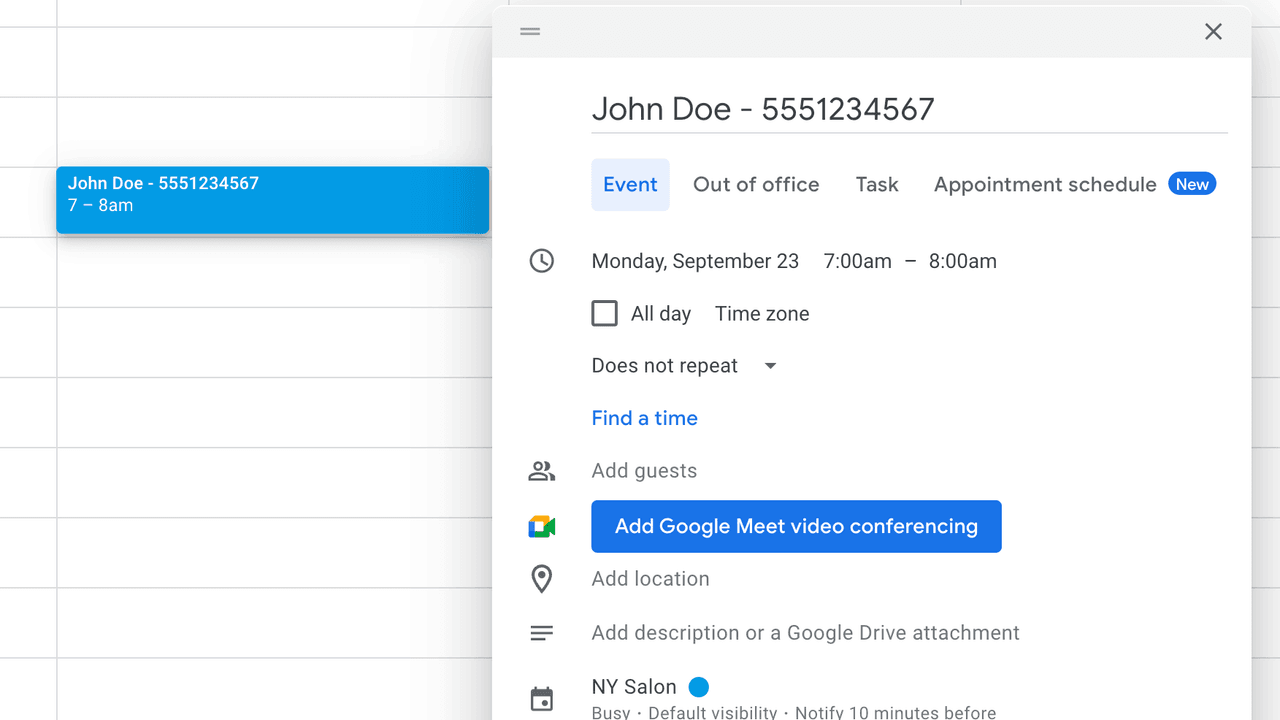
If you received a message from Etisia, it usually means a business you booked with added your phone number to a Google Calendar event and uses Etisia to send automatic reminders.
Etisia does not create the appointment. The business you booked with controls the appointment details and sends the reminder through Etisia.
- 1 The business creates or updates a Google Calendar event.
- 2 Your phone number is included in the event.
- 3 Etisia detects the phone number and sends the reminder.
- 4 If there is no phone number, no SMS reminder is sent.
What should I do?
If the appointment looks familiar, you usually do not need to do anything.
If you do not recognize the appointment, contact the business mentioned in the SMS.
If the message includes opt-out instructions such as “Reply STOP,” you can use them to stop future SMS reminders where supported. You can also ask Etisia not to notify your number.
Run a business? Send SMS reminders from Google Calendar.
Etisia is built for businesses that already use Google Calendar and do not want to switch booking systems. It sends text reminders from Google Calendar events, so you keep the calendar you already use.
The workflow is simple: keep Google Calendar, add a phone number to the event, and Etisia sends the SMS reminder.
Private event
Add a phone number and Etisia will schedule a reminder.
Type the client name and number, right in the title…
Current pricing in your country
The Starter plan begins at $12 per month, billed yearly, and includes 100 SMS. Current country-specific plans, allowances, and features come from Etisia’s local pricing data.
See all plans and featuresSending responsibly
When you send reminders through Etisia, you are responsible for having your client’s consent to text them. Here is how consent works, where recipients can opt out, and how to reach us.
Is Etisia safe?
Etisia only sends reminders for businesses using the service. It is designed for appointment reminders, not marketing blasts. Every Etisia SMS is tied to a specific appointment.
Businesses are responsible for the appointments they create and the phone numbers they include. Etisia processes reminder messages so the business can reduce no-shows and keep clients informed.
- No booking system switch required
- Businesses keep the Google Calendar they already use. Nothing to migrate.
- Works with Google Calendar events
- Reminders are built from the appointment details a business already keeps in their calendar.
- Sends reminders only when a phone number is found
- No phone number in the event means no SMS reminder is sent.
Common questions about Etisia
Quick answers for recipients and business owners.